 Zheng
Zheng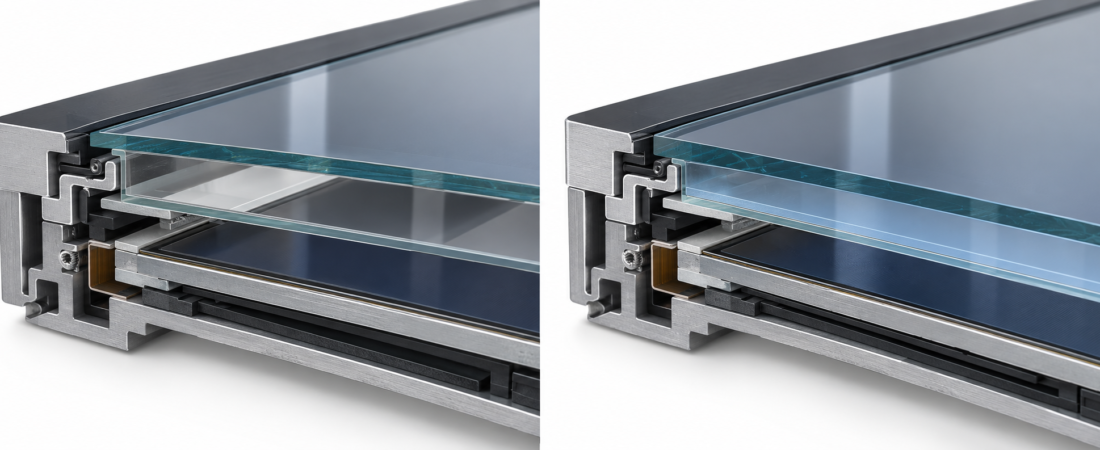
Full optical bonding is worth considering when internal reflections, angled viewing or close-range touch interaction limit display usability. Frame bonding can be a sensible choice for an indoor cabinet with controlled lighting. Compare samples under the actual lighting and software workload: optical bonding changes the display stack, while brightness, surface treatment and enclosure sealing remain separate specifications.
This guide develops the bonding section of our industrial panel PC selection guide. It explains how to choose between the options without assuming that a higher-cost display assembly is necessary for every machine.
What is the difference between frame bonding and full bonding?
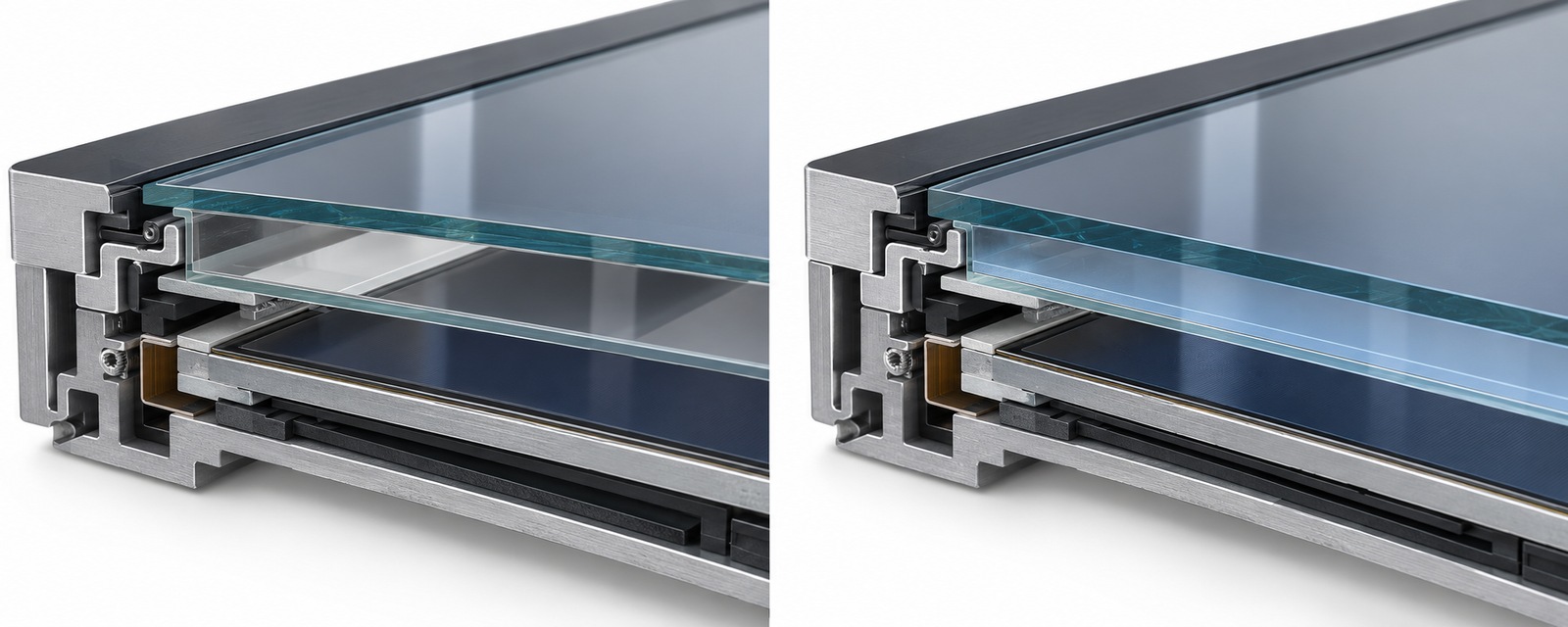
Frame bonding, also called perimeter or air-gap bonding, secures the display layers around their edges while leaving an air space across the viewing area. Full optical bonding fills the specified interface between the LCD and cover glass or touch assembly with an optically clear adhesive.
Air-to-glass interfaces contribute to internal reflections. Filling that interface changes the optical path and can improve readability in strong ambient light. The improvement depends on the complete assembly, including the LCD, cover glass, adhesive and external surface treatment. It is not a universal percentage that can be copied from another manufacturer’s measurements.
An industrial touch assembly can contain several layers. Ask which interface is bonded: cover glass to touch sensor, touch assembly to LCD, or both. A flat-looking front face does not establish what is inside. Advantech’s industrial display bonding overview illustrates the distinction between an air gap and an adhesive-filled optical interface.
Which differences matter to a buyer?
| Selection factor | Frame bonding | Full optical bonding |
|---|---|---|
| Internal air gap | Present in the viewing area | Removed at the bonded interface |
| Bright ambient light | More internal reflection may be visible | Can reduce internal reflections |
| Angled or close-range viewing | Separation between image and touch surface may be more noticeable | Can reduce apparent separation at the bonded interface |
| Initial cost | Often the lower-cost option | Typically adds process and material cost |
| Repair approach | Separate layer replacement may be more practical, depending on design | Rework or replacement of a bonded assembly may be required |
| Water protection | Depends on the enclosure and installation | Still depends on the enclosure and installation |
| Glove or wet-touch operation | Depends on the touch system | Still depends on the touch system |
Compare equivalent configurations. A brighter bonded sample and a dimmer air-gap sample cannot isolate the effect of bonding.
When is frame bonding a practical choice?
Frame bonding is often adequate for an indoor machine whose operator stands directly in front of the display under stable lighting. If alarm text, buttons and process values remain clear throughout a shift, full bonding may provide little operational benefit for that application.
Consider a control cabinet away from windows, with a shaded display and a simple HMI layout. Start by checking the native resolution, viewing angle and software scaling. A reflection problem caused by a lamp positioned directly behind the operator may be addressed by changing the lamp or display angle. Test those practical changes before upgrading the optical stack.
Ask about the repair arrangement as well. Whether the LCD or touch panel can be serviced separately depends on the product, spare parts and assembly process; an air gap alone does not guarantee inexpensive field repair.
When is full optical bonding worth evaluating?
It is especially relevant when an operator must read small text or interact precisely while viewing the display near a window, under strong factory lighting or from changing angles. It can also matter on customer-facing kiosks, where the apparent closeness of the image to the touch surface affects the experience.
For a machine with changing environmental conditions, discuss the construction of the display cavity and any condensation concern with the supplier. Eliminating one air gap does not eliminate moisture from the entire enclosure, and it does not establish a temperature or humidity qualification for the finished product.
ZhengFeng’s TY-X05 family is listed as a full-lamination external-mount option. The TY-X05 15.6-inch product is a starting point for a configuration discussion. Confirm the supplied display stack, brightness and touch behavior in the quotation and sample review.
Does optical bonding make a display sunlight-readable?
Bonding can help with internal reflection, but outdoor readability also depends on display brightness, contrast, the cover surface, shading and viewing angle. Direct sun introduces a thermal load as well. A screen can be easy to read in a short demonstration yet overheat or become difficult to use during sustained operation.
Specify the actual exposure: indoors near a window, under a canopy or in direct outdoor sun. Ask about operating temperature, UV exposure and brightness control for that configuration. Avoid choosing an outdoor terminal from a bonding label alone.
Does full bonding provide IP65 or reliable wet touch?
These are separate requirements. All ZhengFeng industrial panel PC and industrial display models feature front-panel IP65 protection under the specified installation conditions. Both an air-gap design and a bonded design can have front sealing; bonding does not establish a whole-enclosure water rating.
Likewise, a projected-capacitive touchscreen’s behavior with droplets or gloves depends on the sensor, controller, tuning, cover glass and operating system. Request an application test using the intended gloves and expected surface conditions. Read the front-panel IP65 guide for cleaning and rear-port protection.
How should you compare two samples?
Use the same HMI page, text size, resolution, viewing position and comparable brightness settings. Test where the machine will operate rather than under convenient showroom lighting.
- Display the actual alarms, numeric values and touch controls used by operators.
- View the display from the standing, seated and side positions expected in service.
- Check reflections at different times if daylight enters the area.
- Run the intended workload long enough to evaluate usability at normal operating temperature.
- Test touch input with the actual gloves, application and driver configuration.
- Record settings, lighting and observations so the production specification matches the approved sample.
Photographs are useful records but automatic camera exposure can conceal differences that an operator sees. Include written observations and repeat the comparison with the people who will use the machine.
What should the quotation specify?
Ask for the bonding method and bonded interface, LCD resolution and brightness, surface treatment, touch technology, environmental limits and service arrangement. If the software or enclosure changes between samples, record those changes separately. No reflection percentage, impact rating or temperature limit should be assumed from the word “bonded.”
Can I identify full bonding from a front photograph?
Usually not reliably. Reflections, camera exposure and screen content can hide the layer structure. Obtain the configuration specification and evaluate a sample.
Is the most expensive bonding option always the best choice?
No. Choose the option that meets readability, service and environmental needs. An indoor HMI may be well served by frame bonding, while a bright-light operator station may justify full bonding.
Can I choose bonding independently of installation?
Yes, subject to model availability. Review embedded, external and wall mounting separately so the optical choice also fits the machine.
Request a display comparison
Describe the lighting, viewing distance, HMI software, touch requirements and operating environment. Request a display configuration and ask which samples are available for an application comparison.