 Zheng
Zheng
How to Choose an Industrial Panel PC: Mounting, Touch, Display, Enclosure and Size Explained
Selecting an industrial panel PC involves more than choosing a processor and screen size. The installation method, front-frame structure, touch technology, display ratio, enclosure material, ingress protection and connector layout can determine whether a unit fits the machine, remains readable and survives daily operation.
This guide explains the most common parameters and shows how to match them to control cabinets, production equipment, kiosks, inspection stations and other industrial applications.
Important: Terms such as embedded, external mount, panel mount and wall mount are not used identically by every supplier. Before machining a cabinet, always confirm the product drawing, overall dimensions, panel cutout, mounting direction, fastener positions and rear cable clearance for the exact model.

1. Start with the product type
Industrial panel PC
An industrial panel PC combines an LCD, touch panel and computer in one enclosure. It can run Windows, Linux or Android, depending on the selected computing platform. It is suitable when the operator interface needs to run HMI, SCADA, monitoring, inspection, data-entry or equipment-control software locally.
Industrial touch monitor
An industrial touch monitor contains the display and touch interface but no independent computer platform. It connects to an external industrial PC, embedded controller or other video source. Choose a monitor when the computing unit is already installed elsewhere, when the display needs to be replaced independently, or when one computer drives a remote operator screen.
The distinction matters: a monitor specification should focus on video inputs, touch interface and display performance, while a panel PC also requires confirmation of processor, memory, storage, operating system and I/O.
2. Mounting methods: embedded, external mount and wall mount
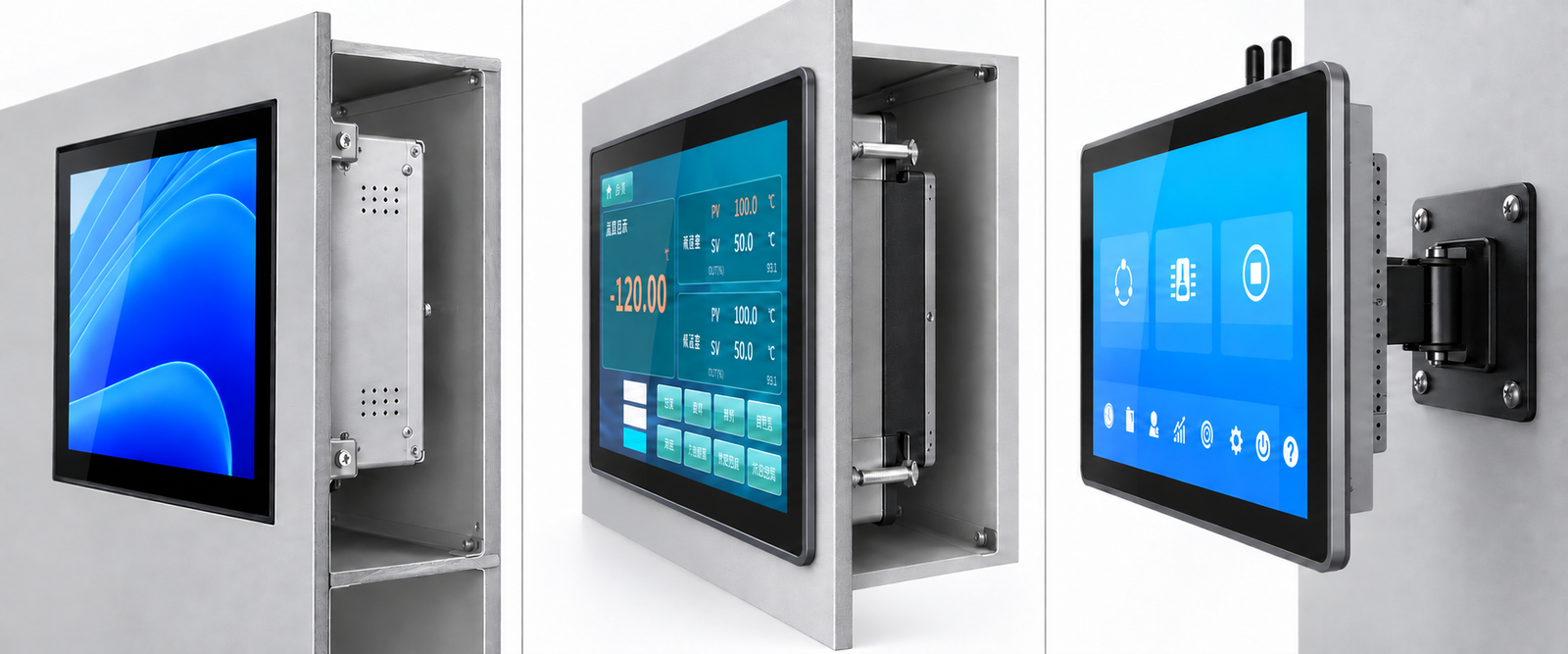
Embedded / rear-mounted installation
In ZhengFeng product terminology, an embedded unit is installed from the inside of the cabinet toward the front opening. After installation, the front surface is designed to sit flush or nearly flush with the surrounding panel, depending on the model and gasket structure.
Choose this structure when:
- a clean, integrated machine front is required;
- the unit should not project far beyond the cabinet surface;
- the enclosure design allows access from inside the cabinet;
- the cutout and retaining structure can be prepared accurately.
Check the bezel depth, cutout tolerance, rear clearance and method used to retain the unit. Do not assume that the nominal screen size determines the cutout.
External-mount installation
An external-mount unit is normally inserted through the opening from the front. Its front flange or bezel overlaps the edge of the cutout, and rear clamps or fasteners secure the unit to the panel.
This arrangement is useful when:
- installation and replacement should be performed from the operator side;
- the front bezel needs to cover the cut edge;
- an existing cabinet can accept a defined rectangular cutout;
- the project requires a visible, robust front frame.
External-mount series may differ in bezel profile, front buttons, enclosure construction and I/O placement. The cutout should be taken from the exact model drawing, not calculated from the display area.
Wall-mounted or VESA-mounted installation
A wall-mounted unit is fixed to a wall, machine arm, stand or bracket through rear mounting holes. Many products use a VESA-style four-hole pattern, but the exact hole spacing, screw specification and load capacity must be confirmed.
Wall mounting is often appropriate for:
- production dashboards and Andon displays;
- operator stations that need an adjustable arm;
- equipment where cutting the cabinet is undesirable;
- larger screens or remote monitoring positions.
VESA’s Flat Display Mounting Interface defines standardized mounting interfaces for flat displays, but the presence of four rear holes alone should not be treated as proof of a particular VESA pattern. Confirm the drawing and bracket compatibility.
3. Frame bonding versus full optical bonding
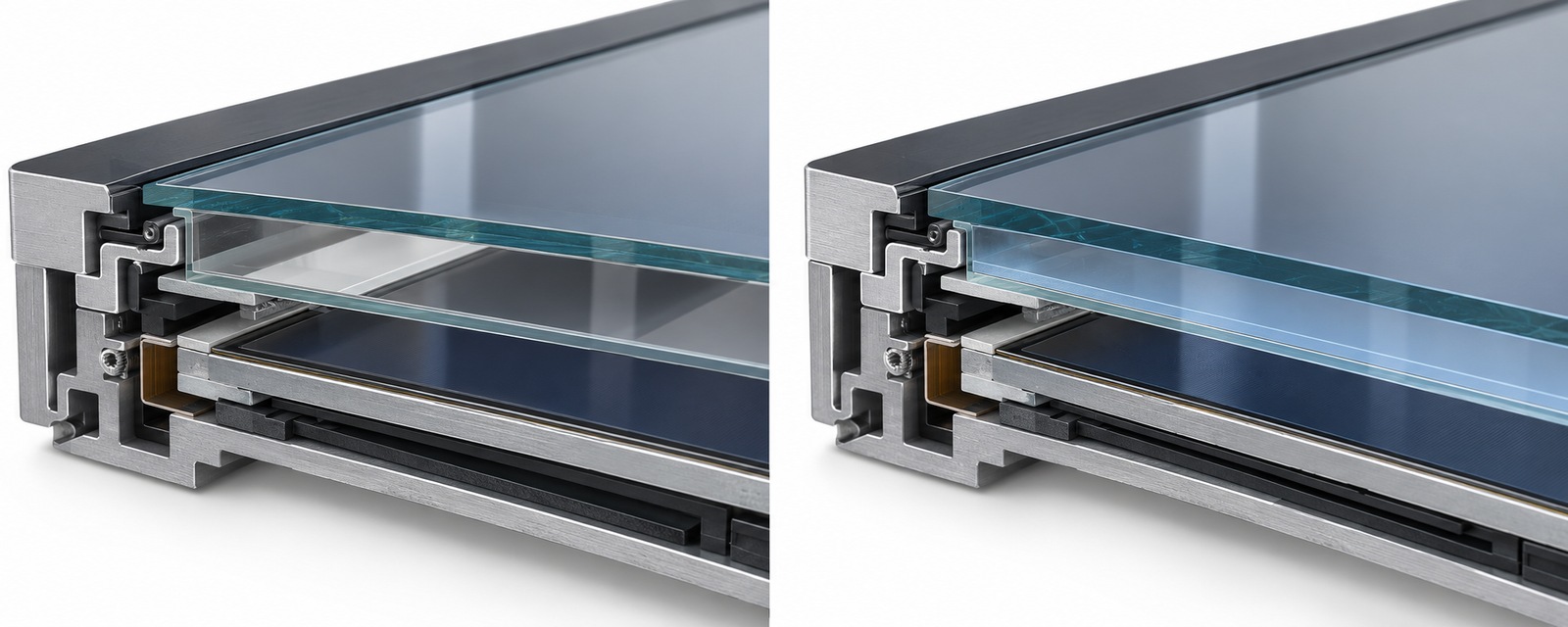
Frame bonding / perimeter bonding
With frame bonding, adhesive is applied around the perimeter between the cover glass or touch panel and the LCD. An air gap remains across most of the viewing area.
Typical advantages include:
- lower cost;
- simpler manufacturing and service;
- adequate performance for many indoor control applications.
Possible trade-offs include more internal reflection, a less direct touch appearance and a greater chance of visible condensation in environments with rapid temperature or humidity changes. Actual performance depends on the complete display construction.
Full optical bonding / full lamination
With full optical bonding, an optically clear adhesive fills the area between the display and the cover glass or touch sensor. Removing the air gap can reduce internal reflection and parallax and can improve perceived contrast, especially under strong ambient light.
Consider full bonding when:
- the operator views the screen from close range;
- reflections make indoor or semi-outdoor use difficult;
- touch accuracy and a more integrated front surface are important;
- vibration, dust or temperature changes make an air gap undesirable.
Full bonding does not automatically make a product waterproof, sunlight-readable or suitable for outdoor use. Brightness, anti-glare treatment, sealing, operating temperature and UV exposure must still be evaluated separately.
4. Enclosure construction: die-cast aluminum and sheet metal
Die-cast aluminum enclosure
Die casting forms a repeatable enclosure or bezel from molten aluminum using a mold. It is well suited to standardized product families produced in volume.
Common benefits include:
- consistent shape and integrated structural details;
- good rigidity for the part thickness;
- rounded, finished bezel geometry;
- useful heat-spreading properties when designed as part of a fanless system.
The trade-off is that new tooling is expensive, so deep mechanical customization is less flexible than with fabricated sheet metal.
Sheet-metal enclosure
Sheet-metal housings are cut, bent, joined and finished from metal sheet. This construction is practical for larger enclosures and projects requiring modified dimensions, hole locations, connectors or rear covers.
Common benefits include:
- greater flexibility for low-volume mechanical customization;
- easier modification of ports and mounting features;
- practical construction for large-format wall-mounted systems.
Performance depends on material thickness, bends, reinforcement, coating, joints and thermal design. “Die-cast” is not automatically better than “sheet metal”; the correct choice depends on volume, customization, weight, sealing and heat dissipation.
5. What front IP65 really means
Ingress Protection ratings are defined by IEC 60529. In IP65:
- the first digit, 6, indicates protection against dust ingress;
- the second digit, 5, indicates protection against water jets under the specified test conditions.
All ZhengFeng industrial panel PC and industrial display models are designed with front-panel IP65 protection. This protection applies to the installed front face, not automatically to the complete enclosure. It depends on correct installation in a suitable panel with the specified gasket, cutout tolerance and mounting pressure.
When evaluating front-panel IP65 protection, confirm:
- Does the rating apply to the front only or the complete unit?
- Is it based on a tested configuration or a structural design claim?
- Are exposed ports, buttons and cable entries included?
- What panel thickness and cutout tolerance are required for the gasket to seal?
- Will the equipment face cleaning jets, rain, oil mist, coolant, steam or chemical agents?
IP65 does not describe corrosion resistance, chemical resistance, impact resistance, operating temperature or suitability for permanent outdoor exposure.
6. Screen size, aspect ratio and physical dimensions
Screen size is the diagonal of the active display area, not the width of the product. Two screens with the same diagonal can have different widths and heights when their aspect ratios differ.
Common industrial aspect ratios include:
- 4:3 — common on 10.4, 12.1 and 15-inch legacy or industrial interfaces;
- 5:4 — common on 17 and 19-inch industrial displays;
- 16:10 — frequently used on 10.1-inch panels;
- 16:9 — common on 11.6, 13.3, 15.6, 18.5, 21.5-inch and larger wide screens.
The table below gives approximate active-display width and height calculated from the nominal diagonal and stated ratio. It is useful for early interface planning only. It is not the product outline, bezel size or cabinet cutout.
| Nominal size | Typical ratio | Approx. active width | Approx. active height |
|---|---|---|---|
| 8 in | 4:3* | 162.6 mm | 121.9 mm |
| 10.1 in | 16:10* | 217.5 mm | 136.0 mm |
| 10.4 in | 4:3 | 211.3 mm | 158.5 mm |
| 11.6 in | 16:9 | 256.8 mm | 144.5 mm |
| 12.1 in | 4:3 | 245.9 mm | 184.4 mm |
| 13.3 in | 16:9 | 294.4 mm | 165.6 mm |
| 15 in | 4:3 | 304.8 mm | 228.6 mm |
| 15.6 in | 16:9 | 345.4 mm | 194.3 mm |
| 17 in | 5:4 | 337.2 mm | 269.7 mm |
| 18.5 in | 16:9 | 409.6 mm | 230.4 mm |
| 19 in | 5:4 | 376.8 mm | 301.5 mm |
| 21.5 in | 16:9 | 476.0 mm | 267.7 mm |
| 23.6 in | 16:9 | 522.5 mm | 293.9 mm |
| 27 in | 16:9 | 597.7 mm | 336.2 mm |
| 32 in | 16:9 | 708.4 mm | 398.5 mm |
| 43 in | 16:9 | 951.9 mm | 535.5 mm |
* Eight-inch and 10.1-inch panels are available in more than one ratio. Confirm the actual LCD specification.
For final mechanical design, obtain all three measurements:
- active area — the visible pixel area;
- overall dimensions — the complete product width, height and depth;
- panel cutout — the opening required for embedded or external mounting.
7. Resolution and pixel density
Resolution is the number of addressable pixels, expressed as horizontal × vertical. Typical combinations include:
- 1024 × 768 — 4:3, common for compact or legacy HMI layouts;
- 1280 × 800 — 16:10, common on 10.1-inch panels;
- 1280 × 1024 — 5:4, common on 17 and 19-inch displays;
- 1366 × 768 — 16:9, used on some wide panels;
- 1920 × 1080 — 16:9 Full HD, useful for detailed dashboards and multi-window interfaces;
- 3840 × 2160 — 16:9 4K, relevant only when the panel, graphics platform and software scaling support it.
Higher resolution provides more workspace, but it is not always the best choice. On a small display, controls and text may become too small unless the operating system and HMI software scale correctly. Legacy applications may be designed for a fixed 4:3 resolution and can display poorly on a wide screen.
Choose the native panel resolution whenever possible. Also confirm that the selected processor or external video source supports that resolution at the required refresh rate.
8. Brightness, contrast and viewing angle
Brightness
Brightness is normally stated in cd/m², also called nits. Standard indoor equipment often needs less brightness than a screen used near windows or under strong factory lighting. High brightness alone does not guarantee outdoor readability; reflection control and optical bonding can be equally important.
Contrast ratio
Contrast ratio describes the luminance difference between white and black under stated test conditions. It helps indicate image separation, but figures from different test methods should not be compared without context.
Viewing angle
Wide viewing angles matter when operators stand, move or view the screen from above or below. Confirm whether the quoted angle is based on contrast or color-shift criteria, particularly for inspection and monitoring applications.
9. Touch technology and front surface
Projected capacitive touch
Projected capacitive touch supports light finger operation and multi-touch gestures. It is suitable for modern HMI interfaces, kiosks and clean industrial environments. Glove performance depends on the controller tuning, glove thickness and cover-glass construction.
Resistive touch
Resistive touch responds to pressure and can be operated with a finger, glove or stylus. It remains useful where precise single-point input or broad glove compatibility is more important than multi-touch gestures.
Also confirm:
- number of touch points;
- touch interface, usually USB and sometimes serial;
- cover-glass thickness and surface treatment;
- operation with water droplets or gloves;
- whether touch calibration is required by the operating system.
10. Fanless cooling and operating environment
Fanless systems use the enclosure and internal thermal path to dissipate heat. They avoid fan noise and reduce the movement of dust through the unit, but they still require free airflow around the heat sink.
Check:
- operating and storage temperature;
- processor thermal design and sustained workload;
- orientation and ventilation clearance;
- direct sunlight or nearby heat sources;
- whether the quoted temperature applies to every processor and storage option.
Do not enclose a fanless heat sink tightly without evaluating the resulting internal cabinet temperature.
11. Processor, memory, storage and operating system
Select the computing platform around the software workload rather than choosing the highest specification by default.
| Workload | Typical requirement direction |
|---|---|
| Simple HMI, data entry or status display | Entry-level ARM or x86 platform may be sufficient |
| Windows HMI/SCADA with database or multiple applications | x86 processor, more RAM and SSD storage |
| Machine vision, AI inference or high-rate data processing | Higher-performance CPU/GPU/NPU platform after software validation |
| Browser-based kiosk or Android application | Confirm Android version, app compatibility and long-term update requirements |
Confirm processor generation, RAM capacity, storage type, storage endurance and operating-system licensing. “4 GB + 128 GB” describes capacity, not processor performance or storage durability.
12. Interfaces and expansion
List every required connection before requesting a quotation:
- Ethernet speed and number of LAN ports;
- serial communication such as RS-232 or RS-485;
- USB quantity, position and version;
- HDMI, VGA or DisplayPort input/output;
- GPIO, isolated I/O or terminal blocks;
- Wi-Fi, Bluetooth, 4G/5G and antenna placement;
- audio, camera or barcode-scanner requirements;
- power connector and input-voltage range.
Photographs may show a representative configuration. The quotation and confirmed port drawing should define what will actually be supplied.
13. How to choose by application
| Application | Recommended priorities |
|---|---|
| Control cabinet HMI | Embedded or external mount; verified cutout; front sealing; serial/LAN I/O; fanless cooling |
| CNC or production equipment | Rigid front frame; glove-compatible touch; readable native resolution; vibration-aware mounting |
| Food, packaging or washdown-adjacent area | Confirm front or full-unit IP rating, gasket installation and resistance to the actual cleaning process |
| Machine-vision station | Resolution, viewing angle, CPU/GPU capability, camera interface, storage speed and network bandwidth |
| Warehouse or production dashboard | Wall/VESA mounting, larger 16:9 display, viewing distance, brightness and bracket load rating |
| Self-service kiosk | Capacitive touch, full bonding if reflections matter, concealed cabling and service access |
| Outdoor or semi-outdoor terminal | High brightness, anti-glare treatment, optical bonding, UV/temperature evaluation and appropriate full enclosure protection |
| Legacy equipment replacement | Match cutout, 4:3 or 5:4 ratio, native resolution, serial ports, power input and software compatibility |
14. A practical selection sequence
- Define the installation: embedded, external mount, wall/VESA or monitor-only.
- Measure the available space: panel thickness, cutout, overall envelope and rear cable clearance.
- Confirm the interface layout: HMI resolution, aspect ratio, control size and viewing distance.
- Describe the environment: dust, water, oil, cleaning, temperature, vibration and lighting.
- Choose touch and bonding: capacitive or resistive; frame bonding or full optical bonding.
- Size the computing platform: software, processor architecture, RAM, storage and operating system.
- List every connector: quantity, protocol, location and cable direction.
- Request drawings and a confirmed configuration: do this before cutting the cabinet or ordering brackets.
- Test a sample: verify software, touch behavior, thermals, interfaces and mechanical fit under real conditions.
15. Information to send when requesting a quotation
To receive a useful recommendation, provide:
- application and software name;
- preferred screen size, resolution and aspect ratio;
- installation method and available cutout;
- touch method and glove/water requirements;
- brightness and viewing environment;
- processor, RAM, storage and operating system;
- required ports and wireless functions;
- IP requirement and whether it applies to the front or complete enclosure;
- operating temperature, quantity and destination country.
ZhengFeng supplies embedded panel PCs, external-mount panel PCs, wall-mounted systems and industrial touch displays in multiple sizes. All models feature front-panel IP65 protection. Because mechanical dimensions, resolution, ports and the protection level of the rear enclosure can vary by model, contact us with the project requirements for a confirmed drawing and configuration.
Request a configuration and quotation →
Frequently asked questions
Is a 15.6-inch panel PC 15.6 inches wide?
No. The 15.6-inch figure is the display diagonal. A typical 16:9 active area is approximately 345.4 × 194.3 mm, while the complete product is larger because of the bezel and enclosure.
Does front IP65 mean the entire panel PC can be sprayed with water?
No. On ZhengFeng models, IP65 applies to the correctly installed front panel. Rear ports and the rest of the enclosure may have a different protection level, so the complete unit should not be treated as fully waterproof unless a separate whole-enclosure rating is confirmed.
Is full optical bonding always necessary?
No. Frame bonding is often sufficient for indoor control cabinets. Full bonding is more valuable where reflection, parallax, condensation risk or close-range visual quality justifies the additional cost.
Is a higher resolution always better?
No. Resolution must match screen size, viewing distance, software scaling and graphics capability. A lower native resolution may be more usable for a legacy HMI with large controls.
Can the cabinet cutout be calculated from the screen size?
No. Use the exact cutout drawing for the selected model and size. Products with the same display diagonal can have different bezels, enclosures and mounting structures.