 Zheng
Zheng
Choose an industrial panel PC mounting method around the machine opening, access for maintenance and exposure of the rear enclosure. A rear-installed embedded unit gives a flush machine front; an external-mount unit covers the cutout with its front flange; a wall-mounted unit uses a rear bracket. Confirm the exact mechanical drawing before ordering.
For display size, processors and other selection factors, start with our industrial panel PC parameters guide. This article focuses on the mechanical decisions that are difficult to change after a cabinet has been manufactured.
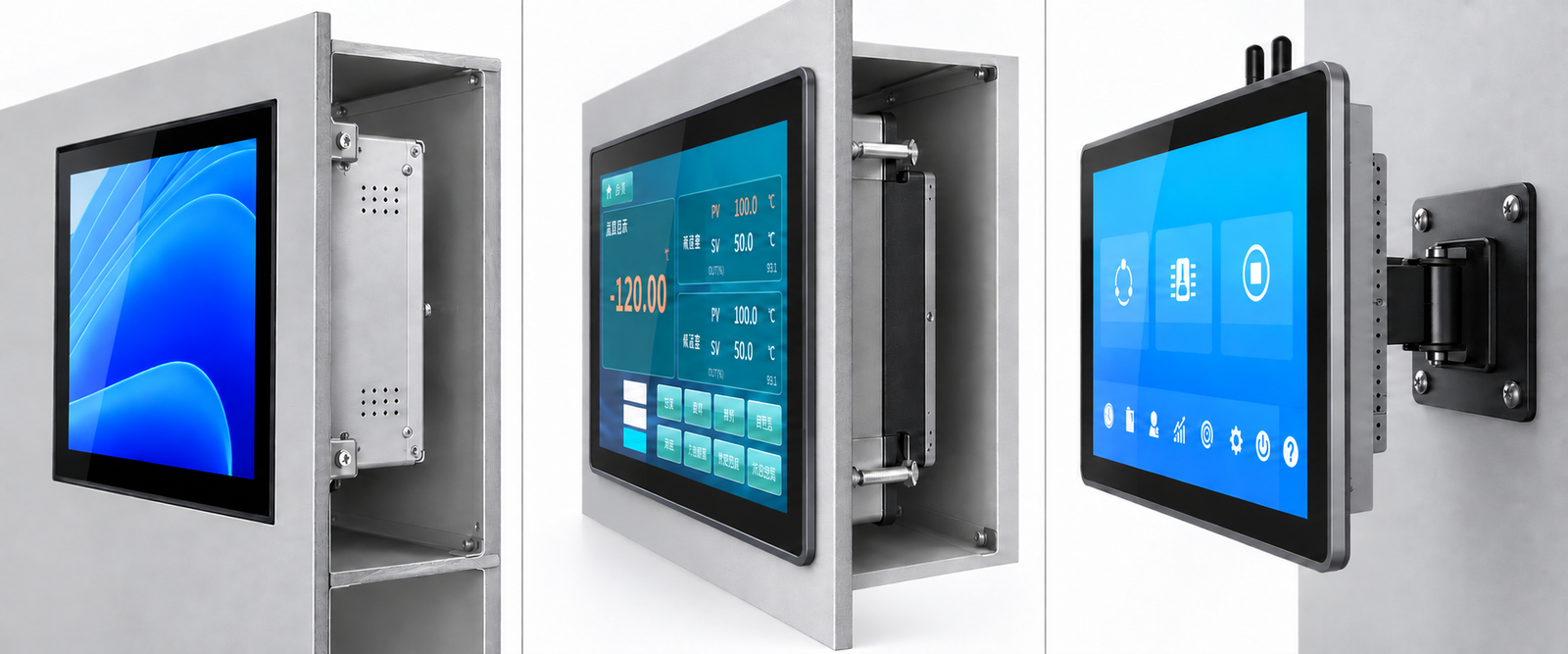
How do the three mounting methods differ?
| Decision | Embedded, installed from inside | External mount, installed from front | Wall or bracket mount |
|---|---|---|---|
| Front appearance | Front surface aligned with the machine panel in ZhengFeng’s embedded design | Slim front flange overlaps the cutout | Complete display enclosure remains outside the machine |
| Machine preparation | Opening and internal retaining structure | Opening, suitable sealing surface and rear fastener access | Suitable supporting surface and bracket |
| Rear access | Needed for installation and retention | Usually needed for clamps and cabling | Needed for bracket, cables and service |
| Main fit check | Front alignment, retaining points and internal space | Cutout, flange overlap and panel thickness | Hole pattern, weight, bracket movement and screw engagement |
| Typical use | Integrated machine control front | Cabinet HMI and equipment retrofit | Operator arm, workstation or production dashboard |
Supplier terminology varies. Some suppliers call a front-inserted flange product an embedded panel PC. Specify the insertion direction, front profile and drawing, rather than relying on the product name alone.
When should you choose rear-installed embedded mounting?
Choose this arrangement when the machine needs a flush operator surface and the design provides internal access. In ZhengFeng’s TY-X01 embedded structure, installation proceeds from inside the enclosure toward the front opening, with the finished front face flush with the surrounding installation panel.
The opening and internal supports must work together. A screen that looks right from the outside can still be difficult to install if a cabinet rail blocks a retaining point, or if the computer enclosure conflicts with a power supply behind it. Check the assembly sequence as well as the final position.
Before cutting the machine panel, confirm:
- the complete front outline and the opening dimensions;
- how the unit is located and retained from inside;
- the position of the sealing surface and any specified gasket;
- clearance for rear heat sinks, connectors and cable bends;
- how a technician will support and remove the unit for replacement.
Use the embedded panel PC range to identify the required screen size. For a concrete starting point, see the TY-X01 15.6-inch embedded panel PC, then request its current mounting drawing.
When does an external-mount flange make installation easier?
External mounting suits a cabinet where a front flange can overlap the cutout and provide a defined front contact area. The unit enters from the operator side; retaining hardware secures it behind the panel. Front insertion does not automatically mean all installation or replacement work can be completed without rear access.
The outer frame is a functional part of the installation. On the referenced TY-X03 design, the screen transitions through a sloping chamfer into a narrow flat outer edge. Its slim side profile should not be confused with the much deeper rear computer housing. Neither the bevel nor the visible frame width provides a reliable way to calculate the cutout.
For a retrofit, measure the existing opening, the flat area around it and the panel thickness. Confirm that the new flange covers the opening while the gasket contacts an uninterrupted surface. Old holes, welds or an uneven coating beneath that surface can compromise the seal even when the product fits.
Browse external-mount panel PCs or compare the TY-X03 15.6-inch external-mount model. The confirmed drawing should define the installation, rather than a photograph or nominal screen diagonal.
When is wall or VESA mounting the better choice?
Use a rear bracket when an operator needs an adjustable screen position or when the machine should remain uncut. This is useful beside production cells, on workstation arms and for dashboards viewed from a distance.
The bracket must support the complete configured unit. Check the rear hole spacing, thread, permitted screw engagement and mounting surface. Screw length depends on the bracket and any spacers as well as the product’s permitted engagement; using a longer screw to obtain a stronger connection can damage the enclosure or internal components.
An articulated arm also needs a cable plan. Move the arm through its intended range and confirm that connectors cannot strike the wall or cabinet. Provide strain relief and enough cable movement without leaving a loop that can catch nearby equipment. Preserve the cooling clearance specified for the heat sink.
VESA publishes the Flat Display Mounting Interface standard. Verify the actual model’s pattern and bracket compatibility. Four visible mounting holes alone do not establish compliance or load capacity. See wall-mounted panel PCs and the TY-X02 15.6-inch model.
Does front-panel IP65 protect an exposed rear enclosure?
All ZhengFeng industrial panel PC and industrial display models feature front-panel IP65 protection under the specified installation conditions. The rear enclosure and connectors need their own exposure assessment. This is particularly important on an arm or wall bracket, where the rear is outside a protective cabinet.
For cabinet mounting, the front seal depends on the installation surface, gasket and retaining arrangement. For wall mounting, confirm whether the proposed location keeps rear ports dry and protected. Read the front-panel IP65 installation and cleaning guide before planning cleaning access.
What should you send before ordering?
Send a front and side drawing of the machine, the existing or proposed opening, panel thickness, available rear space and intended cable directions. Add the screen size, installation method and maintenance access constraints. A photograph helps explain the arrangement but does not replace dimensional information.
Ask the supplier to confirm the drawing revision, fixing hardware, sealing arrangement and permitted installation conditions for the exact model and size. Approve these before machining the final panel. If the equipment is a retrofit, test a sample in the existing opening before ordering the production batch.
Can I replace one 15.6-inch panel PC with another without changing the opening?
Only if the mechanical drawings confirm compatibility. The same display diagonal can have a different flange, chassis depth, retaining pattern and cutout.
Does a flush front mean the unit is installed from the front?
No. In ZhengFeng’s embedded design, the unit is installed from inside and finishes flush. State the installation direction explicitly when comparing suppliers.
Does the mounting method determine the optical bonding option?
They are separate choices. Mounting defines how the enclosure attaches to the machine; bonding defines the display stack. See frame bonding versus full optical bonding for the optical decision.
Request a mounting review
Send your opening drawing, panel thickness, preferred screen size and available rear clearance. Request a configuration and mounting drawing before finalizing the cabinet.